What does a food diary in Sayved look like?
It looks like a list of meals you didn’t have to type. You eat, you take a photo or say a sentence, and a few seconds later the meal is in your log with its items, an estimated portion, calories, protein, carbs and fat. You never pick a category or search a food database. Sayved works out that it was food, and which meal it was.
That matters because most food diaries fail at the same point: the entry takes longer than the meal. Sayved is built around capture in under ten seconds. If a meal is only half-described, it is still saved, marked with a lower confidence, and you can correct it later. It never stops you to ask a question first.
What do I say to log a meal?
Say it the way you would tell a friend. A few real examples:
- “Two scrambled eggs on toast and a flat white.”
- “Leftover lentil curry with rice, a big bowl.”
- “Had a banana and a handful of almonds around four.”
- “Dinner was takeaway pizza, three slices, and a can of cola.”
- “Half a packet of crisps while watching the match.”
One sentence can become more than one entry. If you say “porridge for breakfast, then a coffee with oat milk”, the porridge is saved as a meal and the coffee is saved as a caffeine entry under its own category, because Sayved sorts what you say into categories for you. Speech is turned into text on your phone, and the audio itself is never uploaded.
If you would rather type, that works too, and it keeps working even after the free trial ends.
Exactly which fields get stored for a meal?
Each food entry stores:
- Items, each with an estimated portion in grams and its own confidence.
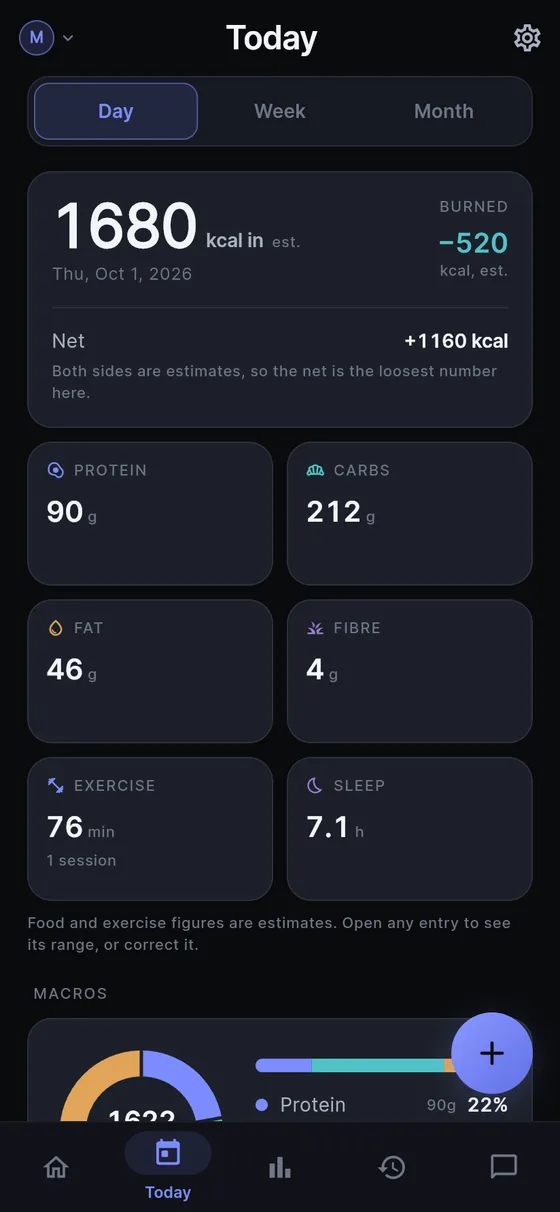
- Calories (kcal) as a point estimate with a low and high range.
- Protein, carbs and fat, each with its own range. Fibre is added only when there is a basis for it.
- Meal type: breakfast, lunch, dinner, snack or unknown.
- Confidence for the whole entry: low, medium or high.
- Your original words, kept as written, and the photo if you used one. The original photo stays on your phone, and a smaller copy is what gets read.
- Time, which you can change to log something from yesterday.
Every number can be edited. When you correct one, the correction is stored separately from the first estimate, so nothing is overwritten and you can see what changed. Deleting an entry really deletes it from the device.
How does it handle photos of plates and labels?
For a plate, photograph it from above or at an angle, and add more photos if the meal is spread across a table. You review them before saving. For a packaged product, photograph the nutrition label instead: the numbers on the label are used to compute a real total for the amount you ate, rather than a guess from appearance. The details are on the nutrition label scanner page, and the photo reading is explained in calorie estimation from a photo.
The honest part: an estimate from a photo is consistent more than it is exact. The same plate should read the same way each time, which is what makes a week of entries comparable, but any single number can be off. That is why the range is always shown.
Where does the meal show up afterwards?
- Today lists the meals of the day, with the totals for calories and macros. Estimated totals are marked with a ”~”.
- History is the searchable list of everything you have logged, meal by meal.
- Reports covers a week up to all time: energy eaten, macros, and, if you switched on the optional energy baseline, how the day’s intake sits beside your logged exercise. See food and symptom charts. The charts describe what you logged. There are no pass or fail colours, no streaks and no comparison to a goal.
- Ask answers questions from your own entries, such as “What did I eat the day before the headache on Tuesday?” or “How many times did I have takeaway in September?” It only answers when you ask and never volunteers patterns. More in ask your health history.
- Doctor report: you can include food in a printable report for any person and date range, with the ranges kept on the estimates. See health report for doctor.
If a doctor or dietitian has asked you to write down what you eat for a couple of weeks, this is the whole job: speak or snap at each meal, then export or print the range they asked for. A food and symptom diary for a stretch of weeks is described in the IBS food diary page.
Does Sayved judge what I eat?
No, and that is deliberate. It does not say a meal was a lot, healthy, poor or good. It has no streaks, no daily goal, no percentage complete and no red or green days, because a diary that scolds is a diary people stop using. Food is also not treated as sensitive in the way medication or symptoms are, so it can appear in a normal export. If you also log health entries, those are kept out of a “safe” export by default.
What are the honest limits?
Sayved estimates, it does not measure. Sauces, oils and fillings are guesses unless you mention them. Unusual home cooking can read with low confidence. It is not a diet programme: there are no meal plans and no advice. And the AI reading is part of Sayved Pro, which is 14 days free and then $2.99 a month. What you have already logged stays readable, searchable and exportable for free, forever. See pricing for the details.
 Sayved