Can I track macros without weighing my food?
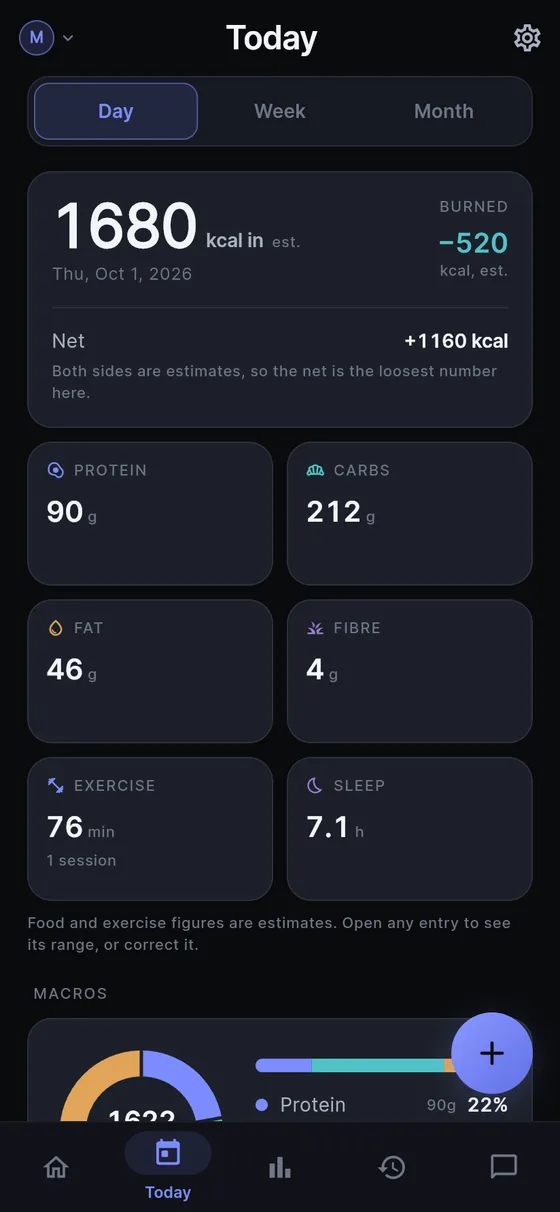
Yes, as long as you accept what a macro log made without a scale can be: a consistent estimate, not a measurement. Sayved looks at the photo, or listens to what you said, works out the foods and a portion, and estimates calories, protein, carbohydrate and fat. Each comes with a range and a confidence, so you can see how loose it is.
The practical gain is that the same plate reads the same way each time. That consistency is what makes a week of numbers worth comparing with another week, even when no single figure is exact. If you do know the weight of something, say it. “200 g of cooked chicken breast” gives the estimate a firm anchor and a tighter range.
A macro tracker from photo and voice works well because it removes the step people quit on, which is searching a database and entering grams.
How do I log protein, carbs and fat by voice?
Hold the capture button and talk the way you would to a friend. You do not name nutrients or pick a meal type. Sayved splits a sentence into separate entries when it needs to.
“Breakfast was two eggs, a slice of sourdough with butter, and a flat white with whole milk.”
That becomes a food entry for the plate and, because of the coffee, may also record caffeine in its own category. If you say the portion, it is used; if you do not, a typical portion is assumed and the range widens to say so. Nothing is blocked while you wait, and a low-confidence entry is saved anyway and can be corrected later. See voice food diary for more phrases that work.
Speech is turned into text on your phone, and audio is never uploaded. Only the text is sent to an AI model, with no name, email or account.
What about photos and nutrition labels?
For a plate, the calorie estimation from a photo flow gives calories and macros in a few seconds, and a multi-photo review screen lets you add another angle before saving. Photos are reduced on your phone to about 640 pixels before they are sent, and the original stays put.
A packet is a different problem, and Sayved treats it differently. On a photographed nutrition label the numbers are already measured, so the job is arithmetic: read the per-serving or per-100 g figures exactly as printed, then scale them to what you ate. A 130 g portion of a food labelled “per 100 g” is scaled up rather than reported raw. If you did not say how much, it assumes one label serving, or the whole package when the weight is stated, and writes that assumption into the entry so you can correct it. More on this in nutrition label scanner.
What does the Macros report show?
Open Reports and choose a week, month, three months, year or all time. The Macros card shows a composition bar of protein, carbs and fat, split by share of energy rather than grams, because fat carries about 9 kcal per gram and protein and carbs about 4. Each band shows its grams beside it so you can read both.
Below that you get your average protein per logged day, and fibre when the entries included it, then a stacked chart of macros day by day. “Per logged day” is deliberate. A week where you logged on three days divides by three, not seven, and a coverage card at the top of Reports tells you how many days have entries, so you never mistake a thin week for a full one.
The report is arithmetic over your own entries. It does not compare you with a standard, last week or a recommended split, and the bars are never red or green. The same numbers feed the energy card, and with the optional baseline switched on you can read intake next to burn, as covered in calorie deficit tracker.
How should I read the numbers?
Treat any single entry as a good estimate and any summed figure as a looser one. Every figure on Reports is built from entries that are themselves estimates, so a weekly protein average is an estimate of an average, and the report footer says so. Two habits help:
- Say or photograph the same kind of meal in the same way, so the bias, if there is one, is consistent.
- Correct the entries that matter to you. Your correction is stored separately from the model’s original, and reports use the corrected value.
If a number looks wrong, edit it. If you are working with a dietitian, show them the health charts and reports or ask them what level of precision they need.
No. It does not say a meal was high in anything, praise a high-protein day, or warn about a low one. There are no targets to hit, no completion rings and no streaks. A macro log with feedback attached turns into a game for some people and a source of anxiety for others, so Sayved simply keeps the record and answers when you ask. You can ask it plain questions such as “what did I eat the last time I trained legs?” and it replies from your own entries.
Food logging by photo and voice uses Sayved Pro, which is $2.99 a month after 14 days free. Everything you have logged stays readable, searchable and exportable afterwards, and you can still log by typing.
 Sayved