Three nights of fever, and a question at the surgery
Your daughter runs a temperature on Sunday evening. You take it, give her a dose of paracetamol and put her to bed. At two in the morning it is back up, so you check again. By Tuesday you are in a waiting room, and the receptionist asks the sort of question every parent gets: how high did it go, when was the last dose, and how many days has this been going on?
You have the numbers somewhere. Some are in your head, some are in a message to your partner, and one is on a scrap of paper in the kitchen. Standing there with a tired child, you give an honest approximation.
A child health tracker earns its place on those nights. Sayved is built so the record is made by speaking one sentence while your hands are busy with a thermometer and a spoon.
Why does a voice log beat memory for a child’s health?
Parents are often logging during the worst possible conditions: in the dark, one-handed, tired, with a child on the other arm. The details that matter, such as the temperature, the time of each dose and what the child drank, are also the ones that blur by morning.
A spoken log solves two problems at once. It needs no typing, and it stamps each event with its time as you say it. It also splits a sentence into separate entries, so the temperature and the dose are stored as a health entry and a medication entry rather than as one lump of free text. That makes “when was the last dose?” a lookup instead of an argument.
How do I set up a child health tracker in two minutes?
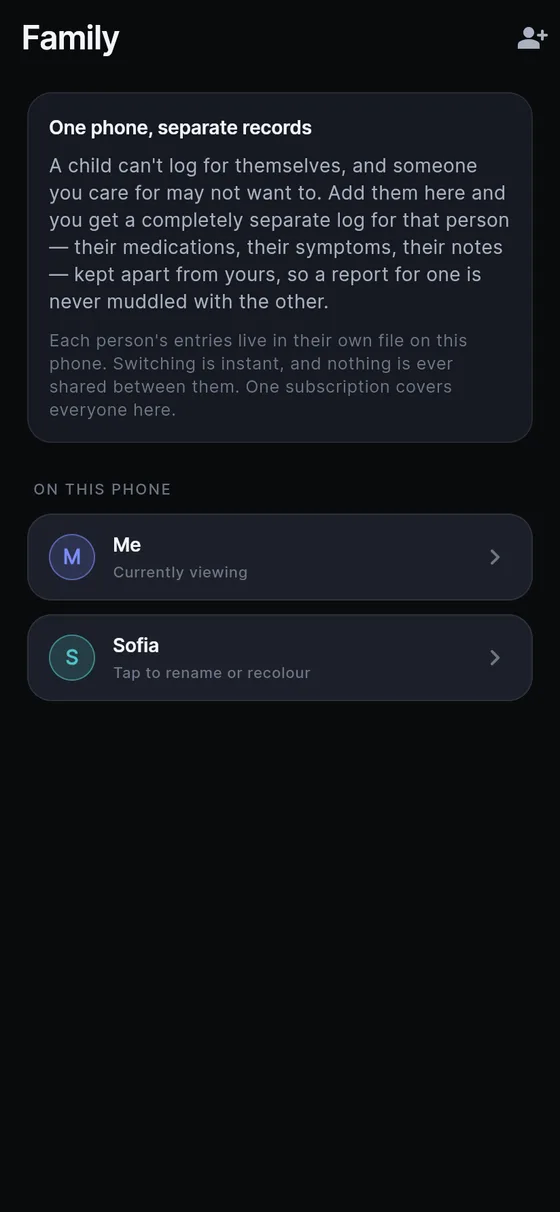
- Add the child. Settings → Family → Add someone. It asks for a name and nothing else: no date of birth, no relationship. Add each child separately.
- Always check whose log you are in. When a profile other than yours is active, the name appears in the app bar on every screen. Switch from the app bar before you log. Each person’s entries live in their own file on the phone, so nothing can cross over between profiles by accident.
- Make a condition if there is a long-running thing. If a child has recurring eczema, ear infections or something you want to see in one place, Settings → Conditions → New condition and name it in your own words, such as “Mia’s ears”. The app never suggests a condition and never says a child has one.
- Routines for regular medicine. If a child takes something every day, open one of its medication entries and tap “Add to daily routine”. It then waits at the top of Today, and one tap files the dose again, already complete. A routine never files anything on its own; you tap each one, so the log stays true. Hold the tick to log a different amount just once.
- Reminders, if you want them. Settings → Reminders are per profile, off by default and use your own wording. They fire whichever profile is on screen, and they stay silent if you have already logged. Avoid putting a child’s name or condition in the wording if the phone is often on the table.
What do I say to log a child’s fever or medicine?
Say it like you would to your partner:
- “Temperature thirty-eight point two under the arm, a bit flushed.”
- “Gave him ibuprofen, five millilitres, just now.”
- “Rash on her tummy and back, small red spots, not itchy, noticed after her bath.”
- “He ate half a sandwich and drank a full cup of water.”
- “Antibiotic, second dose of the day, seven in the evening.”
To record a rash, take a photo as well. It stays on the phone, in that child’s own folder. Any rating, such as how unsettled a child seemed, uses the app’s one 0–10 scale, where the number is how much of the named thing there is.
What should I ask the log after a bad week?
Ask answers from that child’s entries only, and says which profile it answered from. It answers when you ask and never volunteers an opinion. Useful questions include:
- “What was the highest temperature I logged this week?”
- “When was the last paracetamol dose?”
- “How many doses of antibiotic has she had since Monday?”
- “What did I log the last time the rash came back?”
- “List everything logged for Mia in the last ten days.”
Always check the name at the top of the answer before relying on it. If the log is thin, the answer carries a caveat saying so.
How do I show the paediatrician?
Go to Settings → Doctor report. Switch to the child’s profile first (the report is for whoever is active), then pick a period of one month, three months, six months, a year or everything. If you created a condition, pick it to show only what is tagged to it. Leave “Include health, medication and mood” on, since that is usually what a clinician wants.
The result is a readable, day-by-day document that you can print, save as a PDF or send ahead. It lists what you logged and keeps estimates as ranges; it summarises nothing and draws no conclusions. Our doctor visit report page covers the settings in more detail, and the family health tracker page explains how separate profiles work.
Limits, and what this is not
Sayved is a personal record, not medical advice and not a medical device. It cannot tell you whether a fever is serious, how much of a medicine a child should have or whether to wait. A baby with a fever, a child who is hard to wake, or one who is struggling to breathe needs medical help, not an app. Call your doctor or emergency services.
Sayved also never comments, grades or sends alerts about your child. There are no scores and no good or bad days.
Reading your voice and photos, and Ask, are part of Sayved Pro: 14 days free, then $2.99 per month. One subscription covers every profile on the phone, and everything already logged stays readable, searchable and exportable afterwards at no cost. For asthma specifically, see the asthma diary.
 Sayved