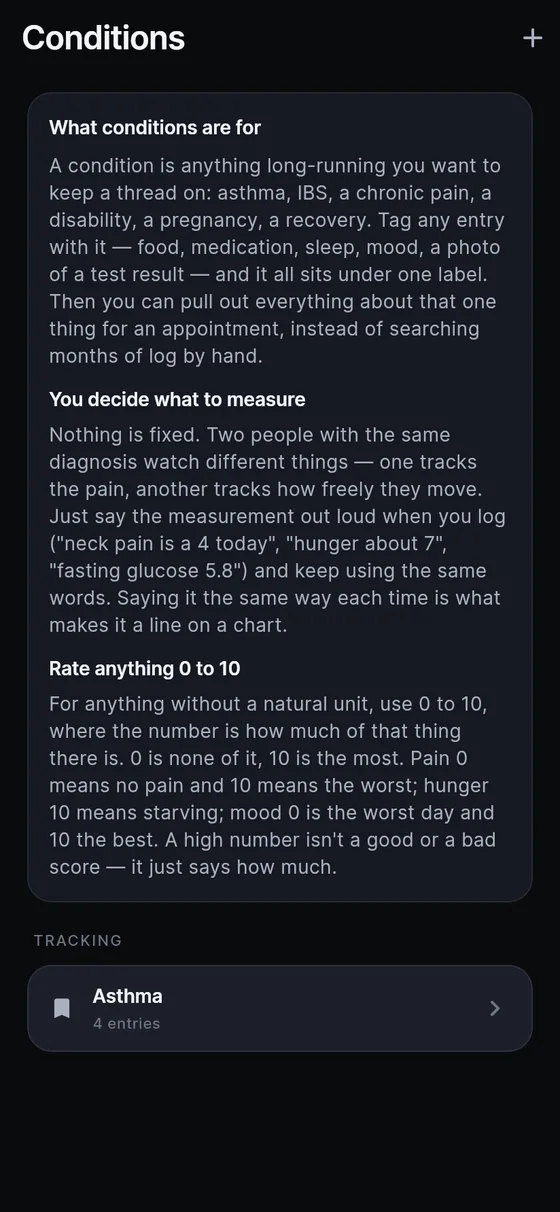
What is a condition in Sayved?
A condition is any long-running thing you want to keep a thread on: asthma, IBS, chronic pain, a disability, a pregnancy, recovery from a fracture. It is not a category. Your meals stay meals and your doses stay doses. The condition is a label laid over them, and one entry can carry several labels while one label can collect hundreds of entries.
That matters at the appointment. “Everything about my asthma since January” is something a clinician can use. A raw scroll through months of logging is not. A chronic condition tracker is only useful if the grouping is effortless, which is why Sayved does it for you once you have named the thing.
How do I track a health condition over time?
You start in Settings, under Conditions. Tap the add icon, type the name in your own words, and save. There is an optional note field for what you are watching for or what your doctor said. Nothing is created for you and nothing is suggested, and the empty list says so plainly: Sayved never decides that you have a condition.
From then on you log the way you always do, by voice, photo or typing, with the voice health journal doing the structuring. You do not open the condition, pick it from a list or remember to tag anything. When your sentence or a photo’s summary mentions the name, the entry is linked to the condition on your phone, and the link shows as a chip on the entry. If a link is wrong, one tap removes it. If an entry should belong and does not, one tap adds it.
Because the label is yours, “my back” is a perfectly good condition. Sayved does not translate it into a clinical term, since that would be the app claiming to know something it cannot.
Can I tag symptoms to a condition after the fact?
Yes, and this is what makes the first report worth generating on day one rather than in three months. The moment you create a condition, Sayved searches the entries you already have for the name and tags the matches. You see a message such as “Found 6 earlier entries that mention it, and tagged them.” The earlier entries are not changed, only linked.
Entries from any category can join: a food entry where you wrote that dairy seemed to set it off, a medication entry, a night of poor sleep, a photographed letter. Reading, tagging and removing tags all happen on the phone.
What should I measure for a condition?
Nothing is fixed, and Sayved does not ship a list of “what to track for asthma”. Two people with the same label watch different things: one tracks the pain, another how freely they move. You decide by saying the measurement out loud: “Neck pain is a 4 today”, “breathing about a 6”, “fasting glucose 5.8”.
Two habits make those lines useful later. First, use the same words each time, so “neck pain” is always “neck pain”. Second, use the 0 to 10 scale for anything without a natural unit, where the number says how much of the named thing there is. Pain 0 is no pain and 10 is the worst. Mood 0 is the worst day and 10 the best. A high number is not a good number or a bad one, only a quantity, and Sayved never colours or grades it. If you say “mood is good”, the entry shows the number it converted the word into, and you can slide it to what you meant.
What does the quiet-condition check-in do?
A list of conditions can fill with abandoned ones, which makes a later report worse. So after about three days with nothing logged against a condition, Sayved sends one gentle notification at about 18:00: “Still tracking what you added?” It never names the condition, never says you missed anything, and there is only ever one, however many conditions are quiet. Logging anything clears it. Tapping it opens the Conditions list, not the microphone.
Be aware that this is the single notification in the app you did not switch on yourself, a deliberate exception to the rule that Sayved never nags. If you would rather not see it, you can turn Sayved’s notifications off in Android settings. Each quiet condition also shows a small prompt in the Conditions list with “Mark resolved” as an equally ordinary answer.
How does a condition reach my doctor?
In the doctor report screen you choose the person, the date range and, if you wish, one condition. The result is a document: everything tagged to it, day by day, in plain language, medication doses and symptom ratings on the same timeline. You can open it in a browser, print it, or send it ahead of the appointment. Estimates keep their ranges, and lines written by the app rather than by you are marked “not self-reported”. Read more on the doctor visit report page.
You can also simply ask. “What did I take last time this flared up?” is answered from your own entries by Ask, and only when you ask. Sayved never volunteers that two things seem connected.
For a household, each person’s conditions live in their own log, so a parent can keep a child’s record separate. See the family health tracker for how profiles work.
 Sayved